FMSoft uniGUI components tryout

FMSoft uniGUI components version - Professional 1.90.0.1552 were tested in Embarcadero Delphi 11.3 Update 3 and Embarcadero Delphi 10.4.1 Update 1.

Embarcadero Delphi 11 Update 3

Argument out of range while using TuniDBGrid and TuniDBVerticalGrid

Two components: UniDBGrid (class TuniDBGrid) and UniDBVerticalGrid (class TuniDBVerticalGrid) showed erratic behavior in Embarcadero Delphi 11 environment. Both of them gave out error “Argument out of range” after placing om form. The mouse became trapped inside the form and it was difficult to release.

Several other components from some Categories: uniGUI Standard: UniCheckBox, UniGridPivotExcelExporter, UniStringGrid, UniFieldSet, UniFieldContainer, uniGUI Additional: UniBitBtn, UniDBEdit, uniGUI Data Controls: UniDBNumberEdit, UniDBMemo, UniDBHTMLMemo, UniDBNavigator, UniDBListBox, UniDBImage were tested and looks like they worked as expected.


Embarcadero Delphi 10.4 Update 1

FMSoft uniGUI standalone server working with TuniDBGrid and TuniDBVerticalGrid

Either UniDBGrid or UniDBVerticalGrid did not generate any errors and were workable in Embarcadero Delphi 10.4.1 environment.

An interesting fact: if the project is created, these components are placed on the form and everything is saved in the Delphi 10.4.1 environment, then these components and the project is workable if opened in Delphi 11.3.


Argument out of range Details:

[5B9CA55A]{rtl280.bpl } System.Classes.TCollection.GetItem (Line 6398, "System.Classes.pas" + 1) + $A [528F535A]{vcldb280.bpl} Vcl.DBGrids.TDBGridColumns.GetColumn (Line 1888, "Vcl.DbGrids.pas" + 1) + $4 [528F7C9E]{vcldb280.bpl} Vcl.DBGrids.TCustomDBGrid.DrawCell (Line 3008, "Vcl.DbGrids.pas" + 78) + $B [5ADF307B]{vcl280.bpl } Vcl.Graphics.TCanvas.FontChanged (Line 4346, "Vcl.Graphics.pas" + 4) + $A [5AF7C537]{vcl280.bpl } Vcl.Grids.DrawCells (Line 2421, "Vcl.Grids.pas" + 48) + $12 [5AF7CEE5]{vcl280.bpl } Vcl.Grids.TCustomGrid.Paint (Line 2600, "Vcl.Grids.pas" + 125) + $2F [5C585B2F]{vclactnband280.bpl} Vcl.ActnMenus.CallWindowHook (Line 762, "Vcl.ActnMenus.pas" + 20) + $F [5ADF2D92]{vcl280.bpl } Vcl.Graphics.TCanvas.SetPenPos (Line 4221, "Vcl.Graphics.pas" + 1) + $9 [5AE23A27]{vcl280.bpl } Vcl.Controls.TCustomControl.PaintWindow (Line 14691, "Vcl.Controls.pas" + 6) + $5 [5AE1D3B5]{vcl280.bpl } Vcl.Controls.TWinControl.PaintHandler (Line 10728, "Vcl.Controls.pas" + 4) + $14 [5AE1DBB0]{vcl280.bpl } Vcl.Controls.TWinControl.WMPaint (Line 10931, "Vcl.Controls.pas" + 6) + $5 [5AE239C1]{vcl280.bpl } Vcl.Controls.TCustomControl.WMPaint (Line 14680, "Vcl.Controls.pas" + 2) + $4 [5AE1802E]{vcl280.bpl } Vcl.Controls.TControl.WndProc (Line 7591, "Vcl.Controls.pas" + 91) + $6 [5AE19B02]{vcl280.bpl } Vcl.Controls.TControl.GetStyleName (Line 8627, "Vcl.Controls.pas" + 1) + $8 [5AE19B2E]{vcl280.bpl } Vcl.Controls.TControl.GetStyleName (Line 8631, "Vcl.Controls.pas" + 5) + $7 [5B8D0683]{rtl280.bpl } System.TObject.Dispatch (Line 19228, "System.pas" + 11) + $0 [5AF270E5]{vcl280.bpl } Vcl.Themes.TStyleHook.WndProc (Line 7713, "Vcl.Themes.pas" + 38) + $6 [5AF272C6]{vcl280.bpl } Vcl.Themes.TMouseTrackControlStyleHook.WndProc (Line 7812, "Vcl.Themes.pas" + 1) + $4 [5AF6B410]{vcl280.bpl } Vcl.Forms.TScrollingStyleHook.WndProc (Line 14905, "Vcl.Forms.pas" + 0) + $0 [5AF2690A]{vcl280.bpl } Vcl.Themes.TStyleHook.HandleMessage (Line 7418, "Vcl.Themes.pas" + 20) + $6 [5B04AE92]{vcl280.bpl } Vcl.Styles.TStyleEngine.HandleMessage (Line 3610, "Vcl.Styles.pas" + 22) + $7 [5AF23338]{vcl280.bpl } Vcl.Themes.TStyleManager.HandleMessage (Line 5872, "Vcl.Themes.pas" + 11) + $11 [5AE1B1D3]{vcl280.bpl } Vcl.Controls.TWinControl.DoHandleStyleMessage (Line 9462, "Vcl.Controls.pas" + 0) + $F [5AE1D1F5]{vcl280.bpl } Vcl.Controls.TWinControl.WndProc (Line 10644, "Vcl.Controls.pas" + 170) + $6 [7A97FA59]{uniGUI28Core.bpl} Uniguibaseclasses.TUniGUIBaseControl.VCLWndProc + $19 [5AE1C700]{vcl280.bpl } Vcl.Controls.TWinControl.MainWndProc (Line 10321, "Vcl.Controls.pas" + 3) + $6 [5B9E5C1C]{rtl280.bpl } System.Classes.StdWndProc (Line 18517, "System.Classes.pas" + 8) + $0 [5AF65263]{vcl280.bpl } Vcl.Forms.TApplication.ProcessMessage (Line 11488, "Vcl.Forms.pas" + 23) + $1 [5AF652A6]{vcl280.bpl } Vcl.Forms.TApplication.HandleMessage (Line 11518, "Vcl.Forms.pas" + 1) + $4 [5AF655E5]{vcl280.bpl } Vcl.Forms.TApplication.Run (Line 11657, "Vcl.Forms.pas" + 27) + $3 [002380A2]{bds.exe } bds.bds (Line 227, "" + 16) + $2

ZEOS Library support for the Embarcadero Delphi 11, 12

ZEOS Library
While testing the components made by FMSoft uniGUI with databases, I discovered that two versions of Delphi running simultaneously were fighting over Zeolib packages. So I had to make Zeolib support for Embarcadero Delphi 11.
This addition gives the support for Embarcadero Delphi 11 to ZeosLib, changed the LibSuffix from 270 to 280 for Delphi 11.
Published on Github

On November 14th I had to make Zeolib support for Embarcadero Delphi 12.
This addition based on Zeos 7.2.14 Release gives the support for Embarcadero Delphi 12 to ZeosLib, changed the LibSuffix from 280 to 290 for Delphi 12.
Compile for Windows 32 Target Platform.
Before my code edits, the Delphi 12 Athens compiler gave an error: "E2251 Ambiguous overloaded call to 'Max'"
Published on Github
ZeosLib is Database components for Delphi, FreePascal/Lazarus, Kylix, C++ Builder
I used ZEOS Library for development with SQLite.

HexEditor

HexEditor

Simple corrections brought in THexEditor, THexToCanvas by Valient Newman to make the component meet the requirements of Delphi 6 and higher, when the design-time and runtime code must be separated.
Changes published September 6, 2023


Updated 15 dec 2025

Corrections were made to comply with Delphi 2009 requirements.

Checked in Delphi 7 and Delphi 2007, 2009

This component is used in Activity and Authentication Analyzer

The component HexEditor is available in My Github Repository

THexEditor v1.18, THexToCanvas v1.0 Beta 2

THexEditor descends from TCustomGrid, and displays and edits hexadecimal/binary files THexToCanvas is a descendant of TComponent, assign a THexEditor to it, set some properties and you can paint the hex data to a canvas (e.g. printer canvas)

credits to:

John Hamm, john@snapjax.com, http://users.snapjax.com/john/ (s.b. for details)

Christophe LE CORFEC, CLC@khalif.com for his introduction to the EBCDIC format and the nice idea about half byte insert/delete

Philippe Chessa, Philippe_Chessa@compuserve.com for his suggestions about AsText, AsHex and better support for the french keyboard layout

Daniel Jensen, no_comply@usa.net for octal offset display and the INS-key recognition stuff

written by Markus Stephany, mirbir.st@t-online.de, http://home.t-online.de/home/mirbir.st


Переход на новые версии Delphi

What Delphi version matches Delphereum for the best

Delphereum Logo
Delphereum is a Delphi interface to the Ethereum, but one must choose proper Delphi version to compile projects in learning.

Unit scope names are prefixes that are prepended to unit names, this feature appeared in Delphi XE2 (VER230). Delpherium uses Unit scope names, for example, web3.eth.
That means Delphi version must be XE2 or higher.
Rudy Velthuis, one of the co-author, writes in comments section in the heads of units "Delphi version XE2 or later".

Well, but in unit web3.json.pas Stefan van As uses inline variable declarations, for instance,
var I := value.EstimatedByteSize;
such syntax appeared only in Delphi 10.3 Rio (VER330)!
Now I have a choice: either to update Delphi to a version higher than 10.2 Tokyo, or try to correct the sources using conditional compile directives, hiding variable declarations inside lines for versions 230-320 and assuming a role of co-author, needless to say if such activity does not require a serious alteration of the sources, which can lead to other errors.
I am newbie in Delphereum, but not newbie in programming, and I foresee the effect of editing someone's code when you are not good at a subject area.
First I will write to the author, Stefan van As, perhaps, his opinion will be useful or decisive.
unit web3.coincap;

In Delphi XE6 System.NetEncoding in Uses clause was not resolved.
In Delphi XE7 appeared.
Again
unit web3.coincap;

There was System.Types.IAsyncResult neither in Delphi XE6 nor in Delphi XE7.
Present in Delphi XE8, and is in Embarcadero Delphi 11 Alexandria for certain.
I decided to refuse from directive {$IFEND}, leaving the only {$ENDIF} and remove the conditional compilation directive {$LEGACYIFEND ON} at the beginning of the units. I only managed to spoil it with my edits in web3.json.
web3.json unit has copyright (c) 2018 of Stefan van As.
The directive {$ENDIF} was introduced in Delphi XE4, but versions earlier than Delphi X4 with {$IFEND} are out for Delpherium, because now I found out, that at least Delphi XE8 is to continue.
Delphi XE8 and THTTPClient
Delphi XE8 and unit web3.http
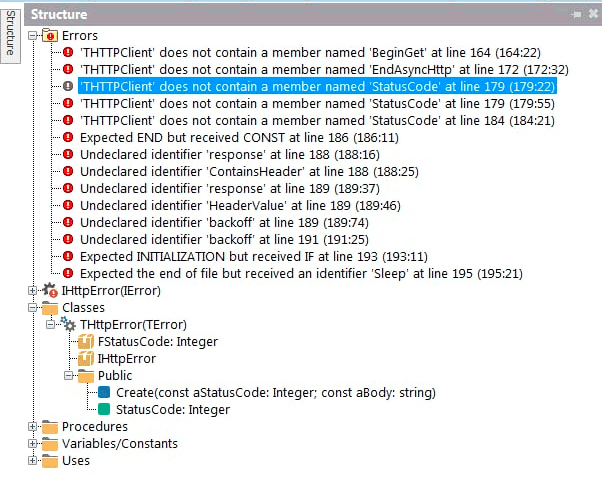
'THTTPClient' does not contain a member named 'BeginGet'...
'THTTPClient' does not contain a member named 'EndAsyncHttp'...
'THTTPClient' does not contain a member named 'StatusCode'...
In Delphi 10.2 Tokyo there appeared:
functions BeginGet, EndAsyncHTTP and property StatusCode
in THTTPClient, unit System.Net.HttpClientent.
But the Delphi 10.2 Tokyo compiler in gave out the next errors, unit web3.http:
E2250 There is no overloaded version of 'get' that can be called with these arguments
in function call
const response = get(URL, [TNetHeader.Create('Content-Type', 'application/json')], backoff);
Embarcadero Delphi 10.3 Rio brings inline variable declarations and now there is no need to insert compiler directives, where inline variable declarations were.
Units web3.http, web3.coincap, web3.json, web3.sync were replaced with original copies.
But the Delphi 10.3 failed to compile, reported two errors in unit web3.coincap:
[dcc32 Error] E2149 Class does not have a default property
in line:
Result := TAsset.Create(TJsonArray(FJsonValue)[Index]);
Class - TJSONArray.
and
[dcc32 Error] E2010 Incompatible types: 'IAsyncResult' and 'web3.IResult'
in
function assets(const callback: TProc, IError>): IAsyncResult;
Embarcadero Delphi 10.4 complied and launched the project Connecting Delphi to a local (in-memory) blockchain

Summing up!
Delphereum with the first example Connecting Delphi to a local (in-memory) blockchain was test in Embarcadero Delphi XE6, Delphi XE7, Delphi XE8, Delphi 10.2 Tokyo, Delphi 10.3 Rio, Delphi 10.4 Sydney, Delphi 11.3 Alexandria.
Delphereum can be compiled and run in Embarcadero Delphi 10.4 Sydney or Delphi 11.3 Alexandria environment.
I got an idea it is wrong for Delphereum to be without a logo and me proposed it.
P.S.
Thanks to my schoolkid son for giving me his old computer for testing.
Github logo
Made the github repositories for source code examples for Ethereum for Delphi Developers (Ethereum programming on Embarcadero Technologies Delphi). All of this was possible due to tutorials of Stefan van As