Showing posts with label Python. Show all posts

Christmas tree on Python on Turtle

Christmas tree on Python on Turtle
# Christmas tree on Python import turtle def line(x1, y1, x2, y2): turtle.penup() turtle.goto(x1, y1) turtle.pendown() turtle.goto(x2, y2) screen = turtle.Screen() screen.title("Christmas Fir tree") screen.setup(500, 500) # To turn the drawing upside down screen.setworldcoordinates(0, screen.window_height(), screen.window_width(), 0) turtle.pencolor('green') line(200,210,220,230) line(220,230,180,230) line(180,230,200,210) line(200,230,230,250) line(230,250,170,250) line(170,250,200,230) line(200,250,250,270) line(250,270,150,270) line(150,270,200,250) line(200,270,270,290) line(270,290,130,290) line(130,290,200,270) line(200,290,290,310) line(290,310,110,310) line(110,310,200,290) turtle.hideturtle() turtle.exitonclick()

This simple code example was intentionally made similar to Christmas tree on Pascal on Android

The Christmas tree on Python on Turtle is available in My Github Repository

Python uses a short circuit technique

Python logo
It turns out that Python uses a short circuit technique as soon as the final result is determined.

Pygame 2.6.1 not installing on Python 3.14.0

Python logo
Installing pygame (version 2.6.1) gives an error that metadata doesn’t work.
A wheel is not released for 3.14 yet. This is not a bug in CPython.
As a temporary measure I rolled back to the previous version Python 3.13.

pygame-ce is a drop-in fork by most of the original development team already has a version for 3.14.

Rainbow by Turtle

An example for programming lessons at school

Rainbow by Turtle
import turtle t = turtle.Turtle() # Setting the title turtle.title("Rainbow by Turtle") t.hideturtle() # Setting the rainbow width rainbow_width = 20 t.width(rainbow_width+1) t.left(90) # Setting the rainbow radius r=50 angle=180 # Colors for the rainbow colors=["violet", "indigo", "blue", "green", "yellow", "orange", "red"] for i in colors: t.color(i) r=r+rainbow_width t.circle(r, angle) t.up() t.right(90) t.forward(rainbow_width) t.down() t.left(90) angle=angle*(-1) turtle.exitonclick() t.done()

Amongus by Turtle on Python

An example for programming lessons at school

Amongus by Turtle on Python
import turtle # Primary colors for the character BODY_COLOR = 'red' GLASS_COLOR = 'skyblue' # Setting the title turtle.title("Amongus by Turtle") # Main object Turtle t = turtle.Turtle() t.hideturtle() # Method for drawing the body def body(): # Brush size t.pensize(20) # Setting the color t.fillcolor(BODY_COLOR) t.begin_fill() # Right side t.right(90) t.forward(50) t.right(180) t.circle(40, -180) t.right(180) t.forward(200) # Head t.right(180) t.circle(100, -180) # Left side t.backward(20) t.left(15) t.circle(500, -20) t.backward(20) t.circle(40, -180) t.left(7) t.backward(50) t.up() t.left(90) t.forward(10) t.right(90) t.down() t.right(240) t.circle(50, -70) t.end_fill() # Method for drawing glasses def glass(): # Moving the turtle t.up() t.right(230) t.forward(100) t.left(90) t.forward(20) t.right(90) t.down() # Setting the color t.fillcolor(GLASS_COLOR) t.begin_fill() t.right(150) t.circle(90, -55) t.right(180) t.forward(1) t.right(180) t.circle(10, -65) t.right(180) t.forward(110) t.right(180) t.circle(50, -190) t.right(170) t.forward(80) t.right(180) t.circle(45, -30) t.end_fill() # Method for drawing a backpack def backpack(): # Moving the turtle t.up() t.right(60) t.forward(100) t.right(90) t.forward(75) # Setting the color t.fillcolor(BODY_COLOR) t.begin_fill() t.down() t.forward(30) t.right(255) t.circle(300, -30) t.right(260) t.forward(30) t.end_fill() # Call all necessary methods body() glass() backpack() turtle.exitonclick() turtle.done()

Monkeypatch to remove "UserWarning: pkg_resources is deprecated as an API" in Python

pypi logo
Anyone who meets similar only annoying "UserWarning: pkg_resources is deprecated as an API",
can solve it using the next commands in Windows Command Prompt or Windows Powershell:

uninstall setuptools
pip uninstall setuptools
reinstall the version which don't have these deprecated warnings.
pip install setuptools==66.1.1
or
pip install setuptools==69.0.2

Version of setuptools which has the deprecated warning: v67.3.0

Having worked through the book "Head First Python, 2nd Edition" by Paul Barry, released November 2016, I naively thought that I knew Python

Head First Python, 2nd Edition by Paul Barry
Having worked through the book "Head First Python, 2nd Edition" by Paul Barry, released November 2016 (Publisher(s): O'Reilly Media, Inc.), I naively thought that I knew Python,

Mike McGrath Python in Easy Steps 2013
But when I started reading Mike McGrath Python in Easy Steps I realized that I don’t even know all the keywords of the Python language. import keyword for word in keyword.kwlist: print(word)

When one reaches the chapter — "Processing requests", there will be problems with Abyss Web Server, the settings made according to the official guide will not help: Adding Python Support.

All examples from the book work when leaving the page ".html" to ".py" page, parameters are passed and everything is displayed.

However, then suddenly everything stops working, even those examples that just worked, when trying to pass something from ".html" to ".py", Abyss Web Server gives the 500 error.

The record in the log: "AttributeError: partially initialized module 'cgi' has no attribute 'FieldStorage' (most likely due to a circular import)."

GUIs with Tkinter (and Fun with Turtles)

Python Turtle Graphics
Turtle graphics is a popular way for introducing programming to kids. It was part of the original Logo programming language developed by Wally Feurzig and Seymour Papert in 1966.

The example that comes with the turtle docs:

from turtle import * color('purple', 'cyan') begin_fill() while True: forward(200) left(170) if abs(pos()) < 1: break end_fill() done()

The example was found in the book "Head First Python, 2nd Edition" by Paul Barry, released November 2016, Publisher(s): O'Reilly Media, Inc.

Getting UserAgent and Browser name in Flask, Python

Head First Python, 2nd Edition by Paul Barry
Inspired by the book "Head First Python, 2nd Edition" by Paul Barry, released November 2016, Publisher(s): O'Reilly Media, Inc.
where some examples don't work
Pages 296-300 of that book

Task 4: Create Code to Work with Our Webapp’s Database and Tables


Determine the Flask version.
First way: two lines in IDLE import flask print(flask.__version__) Second way: one command in Command line: pip show flask The installed Flask version is uptodate - 3.0.3
Determine the Python version.
First way: two lines in IDLE from platform import python_version python_version() Second way: one command in Command line again: python -V The installed Python version is uptodate too - 3.12.3
Coding in Python, Flask from flask import Flask from flask import render_template, request The method request.user_agent.browser returns nothing.
The next method requires one more importing from ua_parser import user_agent_parser
These three lines returns the browser name in browser variable: web_detail = str(request.user_agent) user_browser = user_agent_parser.ParseUserAgent(web_detail) browser = user_browser['family'] or briefer in single code line user_agent_parser.Parse(request.user_agent.string)['user_agent']['family'] I digress a little from the main trend of this note and give a method that receives all the User Agent: request.headers.get("user-agent")

Summing up, at the beginning, I believed the problem was that
"request.user_agent.browser" did not return anything and found other methods to get the browser name. But still nothing was written to the database. I couldn't write to the field "browser_string" in the table "log" of the database "vsearchlogDB" anything, the value after insert operation was Null

How to Fix ImportError: cannot import name 'escape' from

Head First Python, 2nd Edition by Paul Barry
ImportError: cannot import name 'escape' from 'flask'
or
ImportError: cannot import name 'escape' from 'jinja2'
There is no possibility to import name 'escape' from 'flask' (or jinja2).
Today the simplest way is to use from markupsafe import escape instead of from flask import escape.

Jinja is a dependency of Flask and Flask V1.X.X uses the escape module from Jinja, however support for the escape module was dropped in newer versions of Jinja.

Markup and escape should be imported from MarkupSafe.
from flask import escape was found on the page in the article It’s Time to Escape (Your Data) in the book "Head First Python, 2nd Edition" by Paul Barry, released November 2016, Publisher(s): O'Reilly Media, Inc.

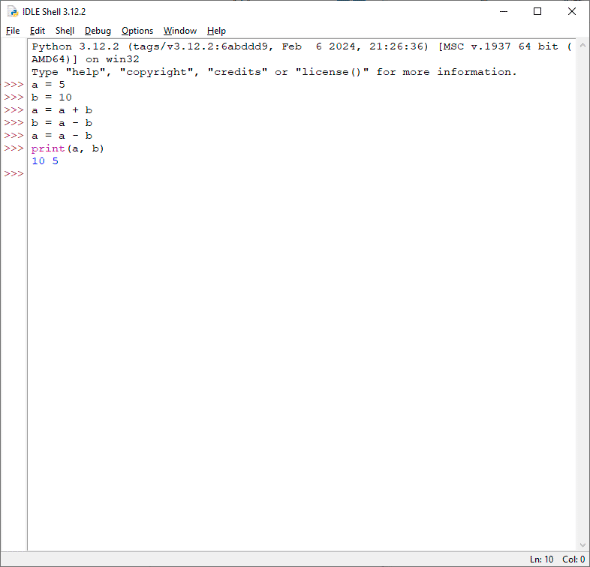
Swapping two variables without using another variable (Arithmetic Operator)

Swapping two variables without using another variable (Arithmetic Operator)
a = 5 b = 10 a = a + b b = a - b a = a - b print(a, b) 10 5
I found this algorithm interesting.
Example made in Python