Showing posts with label Delphi 10 Sydney. Show all posts

Delphi gives when starting "Socket error # 10038 Socket operation on non-socket"

Socket error # 10038 Socket operation on non-socket
"Socket error # 10038 Socket operation on non-socket" is a wide-spread error.
Access violation at address 205B90EA in module 'coreide270.bpl'. Read of address 00000000,
Next messages are "Access violation at address 205B90EA in module 'coreide270.bpl'. Read of address 00000000,", "Access violation at address 5005F8F4 in module 'rt1270.bpl. Read of address 00000000."
This erroneous behavior was noticed in Delphi RAD Studio 10.4 (10.4.1, 10.4.2).
Confirmed to work in Delphi 11.0 as well, with the obvious adjusts for version:
One can try these steps to fix Delphi 10.4:
  1. Shut the Delphi IDE down.
  2. Run Regedit.
  3. Go to the branch HKEY_CURRENT_USER\SOFTWARE\Embarcadero\BDS\21.0\KnownIDE Packages
  4. Find the value with name $(BDS)\Bin\LivePreview270.bpl and change the data from "Embarcadero FireUI Live Preview Package" to "_Embarcadero FireUI Live Preview Package" just adding one or two underscores in the beginning. Other symbols, for instance, I tried to put "#" will not fit, the erroneous behavior will not be fixed.
  5. Restart the Delphi IDE.
This is suitable for Delphi 11 as well, the branch in the system registry is HKEY_CURRENT_USER\SOFTWARE\Embarcadero\BDS\22.0\Known IDE Packages and value name $(BDS)\Bin\LivePreview280.bpl, value data to change is Embarcadero FireUI Live Preview Package
If one get these errors when starting up Delphi RAD Studio, one will have to do these operations every time one reinstall, add "Additional Options", etc.

For loop using an enumeration Example from Learning Embarcadero Delphi

Learning Embarcadero Delphi. Free unaffiliated eBook created from Stack Overflow contributors
Educational Example is from "Learning Embarcadero Delphi" - Free unaffiliated eBook created from Stack Overflow contributors.
The example is on RIP Tutorial - For loop using an enumeration
The code example will not be compiled in Embarcadero Delphi, gives out two error messages, one of them is:
"[dcc32 Error] EnumLoop.dpr(14): E2430 for-in statement cannot operate on collection type 'TWeekdays'" program EnumLoop; uses TypInfo; type TWeekdays = (Sunday, Monday, Tuesday, Wednesday, Thursday, Friday, Saturday); var wd : TWeekdays; begin for wd in TWeekdays do WriteLn(GetEnumName(TypeInfo(TWeekdays), Ord(wd))); end.
The error explanation from docwiki Embarcadero
E2430 for-in statement cannot operate on collection type '%s' (Delphi) Go Up to Error and Warning Messages (Delphi) A for-in statement can only operate on the following collection types: Primitive types that the compiler recognizes, such as arrays, sets or strings Types that implement IEnumerable Types that implement the GetEnumerator pattern as documented in the Delphi Language Guide Ensure that the specified type meets these requirements.
To make the example to work, replace with this line: for wd := Low(TWeekdays) to High(TWeekdays) do
The example was tested in CodeGear Delphi 2007, Embarcadero Delphi 10.4.2 Sydney, Embarcadero Delphi 11.3 Alexandria

Three ways how to add a favicon in uniGui

A favicon (/ˈfæv.ɪˌkɒn/; short for favorite icon), also known as a shortcut icon, website icon, tab icon, URL icon, or bookmark icon, is a file containing one or more small icons associated with a particular website or web page.
In March 1999, Microsoft released Internet Explorer 5, which supported favicons for the first time. Originally, the favicon was a file called favicon.ico placed in the root directory of a website. It was used in Internet Explorer's favorites (bookmarks) and next to the URL in the address bar if the page was bookmarked.
Taken from Wikipedia

To add an icon to the site one must place an ico format file named favicon.ico in the root directory of the site.
But the uniGUI site does not have a root directory. Placing favicon.ico in the module directory does nothing.
This problem can be solved in various ways.

The Viber Analyzer on uniGui project and Embarcadero Delphi 10.4.1 Sydney are used as an example.


The first way is the most obvious.
Since web application is coded in Delphi, one can add an icon to it, like to an ordinary program.
The icon can be set in the Project->Options...->Application->Icons->Application Icon Settings->Icon.
And this icon will be the site icon.

Viber Analyzer on uniGui ScreenShot in Delphi

Viber Analyzer on uniGui ScreenShot
After compiling the project and refreshing the page in the browser, the icon is as needed.
Viber Analyzer on uniGui ScreenShot in Delphi

The second way is a solution from the uniGUI.
A uniGui project has one specialized data module - TUniGUIServerModule.
This is a singleton object that implements server-side functions of a web application.
This module is in the forms list, one must select this module, find the "Favicon" property in the object inspector and load the icon into it.

Viber Analyzer on uniGui Server ScreenShot
UniGUI Server also changes its icon.
The UniGUI Server icon in the property of Windows application, which is visible, for example, in Windows Explorer, is taken from the Project Options in Delphi

The third way is one line of code in the OnBeforeInit event handler in the TUniGUIServerModule successor.
Now, on launching a web application, the icon will be loaded from an external file, and if missing, the icon can added by one of two ways previously described.
procedure TUniServerModule.UniGUIServerModuleBeforeInit(Sender: TObject);
begin
  try
    Favicon.LoadFromFile('favicon.ico');
  except
  end;
end;
or
procedure TUniServerModule.UniGUIServerModuleBeforeInit(Sender: TObject);
begin
  try
    TUniGUIServerModule(Sender).Favicon.LoadFromFile('favicon.ico');
  except
  end;
end;

What Delphi version matches Delphereum for the best

Delphereum Logo
Delphereum is a Delphi interface to the Ethereum, but one must choose proper Delphi version to compile projects in learning.

Unit scope names are prefixes that are prepended to unit names, this feature appeared in Delphi XE2 (VER230). Delpherium uses Unit scope names, for example, web3.eth.
That means Delphi version must be XE2 or higher.
Rudy Velthuis, one of the co-author, writes in comments section in the heads of units "Delphi version XE2 or later".

Well, but in unit web3.json.pas Stefan van As uses inline variable declarations, for instance,
var I := value.EstimatedByteSize;
such syntax appeared only in Delphi 10.3 Rio (VER330)!
Now I have a choice: either to update Delphi to a version higher than 10.2 Tokyo, or try to correct the sources using conditional compile directives, hiding variable declarations inside lines for versions 230-320 and assuming a role of co-author, needless to say if such activity does not require a serious alteration of the sources, which can lead to other errors.
I am newbie in Delphereum, but not newbie in programming, and I foresee the effect of editing someone's code when you are not good at a subject area.
First I will write to the author, Stefan van As, perhaps, his opinion will be useful or decisive.
unit web3.coincap;

In Delphi XE6 System.NetEncoding in Uses clause was not resolved.
In Delphi XE7 appeared.
Again
unit web3.coincap;

There was System.Types.IAsyncResult neither in Delphi XE6 nor in Delphi XE7.
Present in Delphi XE8, and is in Embarcadero Delphi 11 Alexandria for certain.
I decided to refuse from directive {$IFEND}, leaving the only {$ENDIF} and remove the conditional compilation directive {$LEGACYIFEND ON} at the beginning of the units. I only managed to spoil it with my edits in web3.json.
web3.json unit has copyright (c) 2018 of Stefan van As.
The directive {$ENDIF} was introduced in Delphi XE4, but versions earlier than Delphi X4 with {$IFEND} are out for Delpherium, because now I found out, that at least Delphi XE8 is to continue.
Delphi XE8 and THTTPClient
Delphi XE8 and unit web3.http
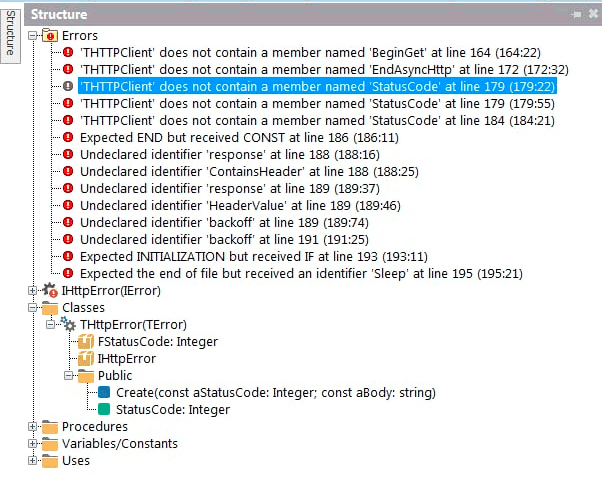
'THTTPClient' does not contain a member named 'BeginGet'...
'THTTPClient' does not contain a member named 'EndAsyncHttp'...
'THTTPClient' does not contain a member named 'StatusCode'...
In Delphi 10.2 Tokyo there appeared:
functions BeginGet, EndAsyncHTTP and property StatusCode
in THTTPClient, unit System.Net.HttpClientent.
But the Delphi 10.2 Tokyo compiler in gave out the next errors, unit web3.http:
E2250 There is no overloaded version of 'get' that can be called with these arguments
in function call
const response = get(URL, [TNetHeader.Create('Content-Type', 'application/json')], backoff);
Embarcadero Delphi 10.3 Rio brings inline variable declarations and now there is no need to insert compiler directives, where inline variable declarations were.
Units web3.http, web3.coincap, web3.json, web3.sync were replaced with original copies.
But the Delphi 10.3 failed to compile, reported two errors in unit web3.coincap:
[dcc32 Error] E2149 Class does not have a default property
in line:
Result := TAsset.Create(TJsonArray(FJsonValue)[Index]);
Class - TJSONArray.
and
[dcc32 Error] E2010 Incompatible types: 'IAsyncResult' and 'web3.IResult'
in
function assets(const callback: TProc, IError>): IAsyncResult;
Embarcadero Delphi 10.4 complied and launched the project Connecting Delphi to a local (in-memory) blockchain

Summing up!
Delphereum with the first example Connecting Delphi to a local (in-memory) blockchain was test in Embarcadero Delphi XE6, Delphi XE7, Delphi XE8, Delphi 10.2 Tokyo, Delphi 10.3 Rio, Delphi 10.4 Sydney, Delphi 11.3 Alexandria.
Delphereum can be compiled and run in Embarcadero Delphi 10.4 Sydney or Delphi 11.3 Alexandria environment.
I got an idea it is wrong for Delphereum to be without a logo and me proposed it.
P.S.
Thanks to my schoolkid son for giving me his old computer for testing.
Github logo
Made the github repositories for source code examples for Ethereum for Delphi Developers (Ethereum programming on Embarcadero Technologies Delphi). All of this was possible due to tutorials of Stefan van As