Showing posts with label Publication. Show all posts

FMSoft uniGUI components tryout

FMSoft uniGUI components version - Professional 1.90.0.1552 were tested in Embarcadero Delphi 11.3 Update 3 and Embarcadero Delphi 10.4.1 Update 1.

Embarcadero Delphi 11 Update 3

Argument out of range while using TuniDBGrid and TuniDBVerticalGrid

Two components: UniDBGrid (class TuniDBGrid) and UniDBVerticalGrid (class TuniDBVerticalGrid) showed erratic behavior in Embarcadero Delphi 11 environment. Both of them gave out error “Argument out of range” after placing om form. The mouse became trapped inside the form and it was difficult to release.

Several other components from some Categories: uniGUI Standard: UniCheckBox, UniGridPivotExcelExporter, UniStringGrid, UniFieldSet, UniFieldContainer, uniGUI Additional: UniBitBtn, UniDBEdit, uniGUI Data Controls: UniDBNumberEdit, UniDBMemo, UniDBHTMLMemo, UniDBNavigator, UniDBListBox, UniDBImage were tested and looks like they worked as expected.


Embarcadero Delphi 10.4 Update 1

FMSoft uniGUI standalone server working with TuniDBGrid and TuniDBVerticalGrid

Either UniDBGrid or UniDBVerticalGrid did not generate any errors and were workable in Embarcadero Delphi 10.4.1 environment.

An interesting fact: if the project is created, these components are placed on the form and everything is saved in the Delphi 10.4.1 environment, then these components and the project is workable if opened in Delphi 11.3.


Argument out of range Details:

[5B9CA55A]{rtl280.bpl } System.Classes.TCollection.GetItem (Line 6398, "System.Classes.pas" + 1) + $A [528F535A]{vcldb280.bpl} Vcl.DBGrids.TDBGridColumns.GetColumn (Line 1888, "Vcl.DbGrids.pas" + 1) + $4 [528F7C9E]{vcldb280.bpl} Vcl.DBGrids.TCustomDBGrid.DrawCell (Line 3008, "Vcl.DbGrids.pas" + 78) + $B [5ADF307B]{vcl280.bpl } Vcl.Graphics.TCanvas.FontChanged (Line 4346, "Vcl.Graphics.pas" + 4) + $A [5AF7C537]{vcl280.bpl } Vcl.Grids.DrawCells (Line 2421, "Vcl.Grids.pas" + 48) + $12 [5AF7CEE5]{vcl280.bpl } Vcl.Grids.TCustomGrid.Paint (Line 2600, "Vcl.Grids.pas" + 125) + $2F [5C585B2F]{vclactnband280.bpl} Vcl.ActnMenus.CallWindowHook (Line 762, "Vcl.ActnMenus.pas" + 20) + $F [5ADF2D92]{vcl280.bpl } Vcl.Graphics.TCanvas.SetPenPos (Line 4221, "Vcl.Graphics.pas" + 1) + $9 [5AE23A27]{vcl280.bpl } Vcl.Controls.TCustomControl.PaintWindow (Line 14691, "Vcl.Controls.pas" + 6) + $5 [5AE1D3B5]{vcl280.bpl } Vcl.Controls.TWinControl.PaintHandler (Line 10728, "Vcl.Controls.pas" + 4) + $14 [5AE1DBB0]{vcl280.bpl } Vcl.Controls.TWinControl.WMPaint (Line 10931, "Vcl.Controls.pas" + 6) + $5 [5AE239C1]{vcl280.bpl } Vcl.Controls.TCustomControl.WMPaint (Line 14680, "Vcl.Controls.pas" + 2) + $4 [5AE1802E]{vcl280.bpl } Vcl.Controls.TControl.WndProc (Line 7591, "Vcl.Controls.pas" + 91) + $6 [5AE19B02]{vcl280.bpl } Vcl.Controls.TControl.GetStyleName (Line 8627, "Vcl.Controls.pas" + 1) + $8 [5AE19B2E]{vcl280.bpl } Vcl.Controls.TControl.GetStyleName (Line 8631, "Vcl.Controls.pas" + 5) + $7 [5B8D0683]{rtl280.bpl } System.TObject.Dispatch (Line 19228, "System.pas" + 11) + $0 [5AF270E5]{vcl280.bpl } Vcl.Themes.TStyleHook.WndProc (Line 7713, "Vcl.Themes.pas" + 38) + $6 [5AF272C6]{vcl280.bpl } Vcl.Themes.TMouseTrackControlStyleHook.WndProc (Line 7812, "Vcl.Themes.pas" + 1) + $4 [5AF6B410]{vcl280.bpl } Vcl.Forms.TScrollingStyleHook.WndProc (Line 14905, "Vcl.Forms.pas" + 0) + $0 [5AF2690A]{vcl280.bpl } Vcl.Themes.TStyleHook.HandleMessage (Line 7418, "Vcl.Themes.pas" + 20) + $6 [5B04AE92]{vcl280.bpl } Vcl.Styles.TStyleEngine.HandleMessage (Line 3610, "Vcl.Styles.pas" + 22) + $7 [5AF23338]{vcl280.bpl } Vcl.Themes.TStyleManager.HandleMessage (Line 5872, "Vcl.Themes.pas" + 11) + $11 [5AE1B1D3]{vcl280.bpl } Vcl.Controls.TWinControl.DoHandleStyleMessage (Line 9462, "Vcl.Controls.pas" + 0) + $F [5AE1D1F5]{vcl280.bpl } Vcl.Controls.TWinControl.WndProc (Line 10644, "Vcl.Controls.pas" + 170) + $6 [7A97FA59]{uniGUI28Core.bpl} Uniguibaseclasses.TUniGUIBaseControl.VCLWndProc + $19 [5AE1C700]{vcl280.bpl } Vcl.Controls.TWinControl.MainWndProc (Line 10321, "Vcl.Controls.pas" + 3) + $6 [5B9E5C1C]{rtl280.bpl } System.Classes.StdWndProc (Line 18517, "System.Classes.pas" + 8) + $0 [5AF65263]{vcl280.bpl } Vcl.Forms.TApplication.ProcessMessage (Line 11488, "Vcl.Forms.pas" + 23) + $1 [5AF652A6]{vcl280.bpl } Vcl.Forms.TApplication.HandleMessage (Line 11518, "Vcl.Forms.pas" + 1) + $4 [5AF655E5]{vcl280.bpl } Vcl.Forms.TApplication.Run (Line 11657, "Vcl.Forms.pas" + 27) + $3 [002380A2]{bds.exe } bds.bds (Line 227, "" + 16) + $2

What Delphi version matches Delphereum for the best

Delphereum Logo
Delphereum is a Delphi interface to the Ethereum, but one must choose proper Delphi version to compile projects in learning.

Unit scope names are prefixes that are prepended to unit names, this feature appeared in Delphi XE2 (VER230). Delpherium uses Unit scope names, for example, web3.eth.
That means Delphi version must be XE2 or higher.
Rudy Velthuis, one of the co-author, writes in comments section in the heads of units "Delphi version XE2 or later".

Well, but in unit web3.json.pas Stefan van As uses inline variable declarations, for instance,
var I := value.EstimatedByteSize;
such syntax appeared only in Delphi 10.3 Rio (VER330)!
Now I have a choice: either to update Delphi to a version higher than 10.2 Tokyo, or try to correct the sources using conditional compile directives, hiding variable declarations inside lines for versions 230-320 and assuming a role of co-author, needless to say if such activity does not require a serious alteration of the sources, which can lead to other errors.
I am newbie in Delphereum, but not newbie in programming, and I foresee the effect of editing someone's code when you are not good at a subject area.
First I will write to the author, Stefan van As, perhaps, his opinion will be useful or decisive.
unit web3.coincap;

In Delphi XE6 System.NetEncoding in Uses clause was not resolved.
In Delphi XE7 appeared.
Again
unit web3.coincap;

There was System.Types.IAsyncResult neither in Delphi XE6 nor in Delphi XE7.
Present in Delphi XE8, and is in Embarcadero Delphi 11 Alexandria for certain.
I decided to refuse from directive {$IFEND}, leaving the only {$ENDIF} and remove the conditional compilation directive {$LEGACYIFEND ON} at the beginning of the units. I only managed to spoil it with my edits in web3.json.
web3.json unit has copyright (c) 2018 of Stefan van As.
The directive {$ENDIF} was introduced in Delphi XE4, but versions earlier than Delphi X4 with {$IFEND} are out for Delpherium, because now I found out, that at least Delphi XE8 is to continue.
Delphi XE8 and THTTPClient
Delphi XE8 and unit web3.http
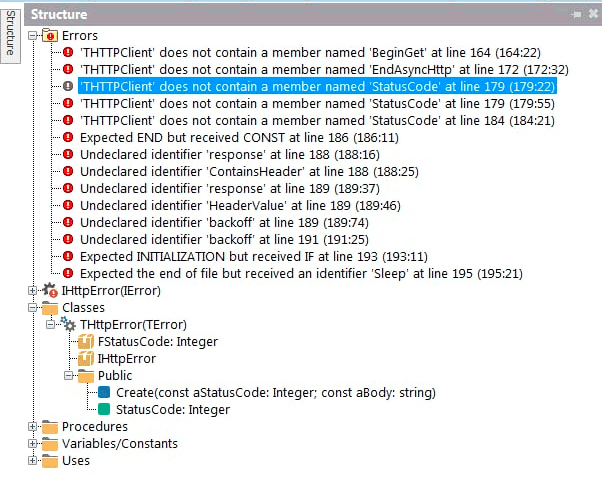
'THTTPClient' does not contain a member named 'BeginGet'...
'THTTPClient' does not contain a member named 'EndAsyncHttp'...
'THTTPClient' does not contain a member named 'StatusCode'...
In Delphi 10.2 Tokyo there appeared:
functions BeginGet, EndAsyncHTTP and property StatusCode
in THTTPClient, unit System.Net.HttpClientent.
But the Delphi 10.2 Tokyo compiler in gave out the next errors, unit web3.http:
E2250 There is no overloaded version of 'get' that can be called with these arguments
in function call
const response = get(URL, [TNetHeader.Create('Content-Type', 'application/json')], backoff);
Embarcadero Delphi 10.3 Rio brings inline variable declarations and now there is no need to insert compiler directives, where inline variable declarations were.
Units web3.http, web3.coincap, web3.json, web3.sync were replaced with original copies.
But the Delphi 10.3 failed to compile, reported two errors in unit web3.coincap:
[dcc32 Error] E2149 Class does not have a default property
in line:
Result := TAsset.Create(TJsonArray(FJsonValue)[Index]);
Class - TJSONArray.
and
[dcc32 Error] E2010 Incompatible types: 'IAsyncResult' and 'web3.IResult'
in
function assets(const callback: TProc, IError>): IAsyncResult;
Embarcadero Delphi 10.4 complied and launched the project Connecting Delphi to a local (in-memory) blockchain

Summing up!
Delphereum with the first example Connecting Delphi to a local (in-memory) blockchain was test in Embarcadero Delphi XE6, Delphi XE7, Delphi XE8, Delphi 10.2 Tokyo, Delphi 10.3 Rio, Delphi 10.4 Sydney, Delphi 11.3 Alexandria.
Delphereum can be compiled and run in Embarcadero Delphi 10.4 Sydney or Delphi 11.3 Alexandria environment.
I got an idea it is wrong for Delphereum to be without a logo and me proposed it.
P.S.
Thanks to my schoolkid son for giving me his old computer for testing.
Github logo
Made the github repositories for source code examples for Ethereum for Delphi Developers (Ethereum programming on Embarcadero Technologies Delphi). All of this was possible due to tutorials of Stefan van As

GitHub Desktop can not be installed on Windows 7

GitHubDesktopSetup-x64.exe - Entry Point Not Found
While installing the GitHub Desktop on Windows 7 the error message is appeared:
"The procedure entry point SetDefaultDilDirectories could not be located in the dynamic link library KERNEL32.dll."
Affected these DLL entry points: "SetDefaultDllDirectories, AddDllDirectory, and RemoveDllDirectory".
The security update KB2533623 is the solution to this problem

Browsing path for Delphereum in Delphi

Delphereum Logo
One of the alternative way to deploy Delphereum sources:
$(BDS)\delphereum; $(BDS)\DelphiBigNumbers\Source; $(BDS)\CryptoLib4Pascal\CryptoLib\src\Interfaces; $(BDS)\CryptoLib4Pascal\CryptoLib\src\Math; $(BDS)\CryptoLib4Pascal\CryptoLib\src\Utils; $(BDS)\CryptoLib4Pascal\CryptoLib\src\Utils\Randoms; $(BDS)\CryptoLib4Pascal\CryptoLib\src\Crypto\Digests; $(BDS)\CryptoLib4Pascal\CryptoLib\src\Asn1\Pkcs; $(BDS)\CryptoLib4Pascal\CryptoLib\src\Asn1; $(BDS)\CryptoLib4Pascal\CryptoLib\src\Utils\Encoders; $(BDS)\CryptoLib4Pascal\CryptoLib\src\Asn1\RossStandart; $(BDS)\CryptoLib4Pascal\CryptoLib\src\Asn1\Oiw; $(BDS)\HashLib4Pascal\src\Interfaces; $(BDS)\HashLib4Pascal\src\Utils; $(BDS)\HashLib4Pascal\src\Base; $(BDS)\HashLib4Pascal\src\KDF; $(BDS)\HashLib4Pascal\src\Nullable; $(BDS)\HashLib4Pascal\src\NullDigest; $(BDS)\HashLib4Pascal\src\Checksum; $(BDS)\HashLib4Pascal\src\Hash32; $(BDS)\HashLib4Pascal\src\Hash64; $(BDS)\HashLib4Pascal\src\Hash128; $(BDS)\HashLib4Pascal\src\Crypto; $(BDS)\HashLib4Pascal\src\Interfaces\IBlake2BParams; $(BDS)\HashLib4Pascal\src\Crypto\Blake2BParams; $(BDS)\HashLib4Pascal\src\Interfaces\IBlake2SParams; $(BDS)\HashLib4Pascal\src\Crypto\Blake2SParams; $(BDS)\CryptoLib4Pascal\CryptoLib\src\Asn1\Nist; $(BDS)\CryptoLib4Pascal\CryptoLib\src\Asn1\Misc; $(BDS)\CryptoLib4Pascal\CryptoLib\src\Asn1\TeleTrust; $(BDS)\CryptoLib4Pascal\CryptoLib\src\Asn1\CryptoPro; $(BDS)\SimpleBaseLib4Pascal\SimpleBaseLib\src\Bases; $(BDS)\SimpleBaseLib4Pascal\SimpleBaseLib\src\Utils; $(BDS)\SimpleBaseLib4Pascal\SimpleBaseLib\src\Interfaces; $(BDS)\CryptoLib4Pascal\CryptoLib\src\Crypto\Prng; $(BDS)\CryptoLib4Pascal\CryptoLib\src\Utils\Rng; $(BDS)\CryptoLib4Pascal\CryptoLib\src\Crypto\Engines; $(BDS)\CryptoLib4Pascal\CryptoLib\src\Crypto\Parameters; $(BDS)\CryptoLib4Pascal\CryptoLib\src\Crypto; $(BDS)\CryptoLib4Pascal\CryptoLib\src\Math\EC; $(BDS)\CryptoLib4Pascal\CryptoLib\src\Crypto\EC; $(BDS)\CryptoLib4Pascal\CryptoLib\src\Asn1\Sec; $(BDS)\CryptoLib4Pascal\CryptoLib\src\Asn1\X9; $(BDS)\CryptoLib4Pascal\CryptoLib\src\Asn1\CryptLib; $(BDS)\CryptoLib4Pascal\CryptoLib\src\Math\Raw; $(BDS)\CryptoLib4Pascal\CryptoLib\src\Math\EC\Multiplier; $(BDS)\CryptoLib4Pascal\CryptoLib\src\Math\EC\Abc; $(BDS)\CryptoLib4Pascal\CryptoLib\src\Math\Field; $(BDS)\CryptoLib4Pascal\CryptoLib\src\Math\EC\Custom\Sec; $(BDS)\CryptoLib4Pascal\CryptoLib\src\Math\EC\Custom\Djb; $(BDS)\CryptoLib4Pascal\CryptoLib\src\Crypto\Signers; $(BDS)\CryptoLib4Pascal\CryptoLib\src\Crypto\Generators; $(BDS)\CryptoLib4Pascal\CryptoLib\src\Crypto\Macs

Delphereum is a Delphi interface to the Ethereum blockchain that allows for development of native decentralized applications.
$(BDS) is path shortcut which contains the full path to RAD IDE including "Bin" folder. Shortcuts are stored in rsvars.bat.

Web3, Decentralized autonomous organizations, Identity, Ethereum address

Ethereum Logo
Web3 solves these problems by allowing you to control your digital identity with an Ethereum address and ENS profile. Using an Ethereum address provides a single login across platforms that is secure, censorship-resistant, and anonymous.
Quote was taken from Introduction to Web3. ethereum.org
I am tormented by seditious thought: the use of a unique and single address of that Ethereum is not the same "Permanent record", utmost centralization, the authentication token, but created and presented by the very man and by his own will?
Zero-knowledge proofs, however, can simplify authentication for both platforms and users. Once a ZK-proof has been generated using public inputs (e.g., data attesting to the user's membership of the platform) and private inputs (e.g., the user's details), the user can simply present it to authenticate their identity when they need to access the service. This improves the experience for users and frees organizations from the need to store huge amounts of user information.
from Zero-knowledge proofs. ethereum.org

No metadata could be loaded for: BlackfishSQL

Database Explore
Description of the problem is given for Delphi 2007.
Window of "Database Explore"
No metadata could be loaded for: BlackfishSQL
While an attempt to launch the "SQL Window" the Message box with error appeared.

Now is the solution:
While the RAD installation "dataexplore.exe.config" file is stored into the path:
"C:\Users\All Users\{6AF0EFC6-B937-4704-A430-319EB93F4C12}\dbexplr\D3C32C11\E7AAAB64..."
The way with aliases is:
"C:\Documents and Settings\All Users\Application Data..."
The "Database Explore" [dataexplore.exe] turns to the contents of the "Config file" [DataExplore.exe.config] which is in the "C:\Program Files\CodeGear\RAD Studio\5.0\bin" path.
The problem is solved by coping the "Config file" from the directory with "All users" path to the "bin" one!

F1026 File not found: 'DockForm.dcu'

CodeGear Delphi 2007
Migrating to Delphi 2005/2006/2007/2009/2010 and higher ussues while Delphi code modernization trend.
There is no DockForm.pas in Delphi 2005/2006/2007/2009/2010 sources but you can use it in your application.
DockForm with such a name appeared in Delphi 4/5, with name uDockForm was in Delphi 6/7.
This is a piece of humpbacked advice:
Just add "designide" in Project -> Options -> Packages -> Build with runtime packages.
The design time package with the code in it is needed, add to "require" section.
Such an advice is applied for research only purposes.
First: to run the application on a computer where Delphi is not installed, one will need the copy bpl-file is required.
Second: it is not allowed to deploy any of that code, copyright would be infringed. One should never be recompiling the code in the toolsapi source directory.
Stub unit
Unit can be used as a temporary measure, a palliative while migrating to new versions of Delphi
unit DockForm;

interface

uses
  Windows, Messages, SysUtils, Variants, Classes, Graphics, Controls, Forms,
  Dialogs;
type
  TDockableForm = class(TForm)
  private
    { Private declarations }
  public
    { Public declarations }
  end;

var
  DockableForm: TDockableForm;

implementation

{$R *.dfm}

end.

Stub DockForm.dfm
object DockableForm: TDockableForm
...
...
end

If you see "...", this means the code is incomplete and this is done intentionally.
If you are unable to apply this, please contact for assistance.
Вы видите "...", это означает, что код не завершён и сделано это намеренно.
Если вам не удалось применить, обращайтесь за консультацией.

CodeGear Delphi 2007 for Win32: F2039 Could not create output file

CodeGear Delphi 2007
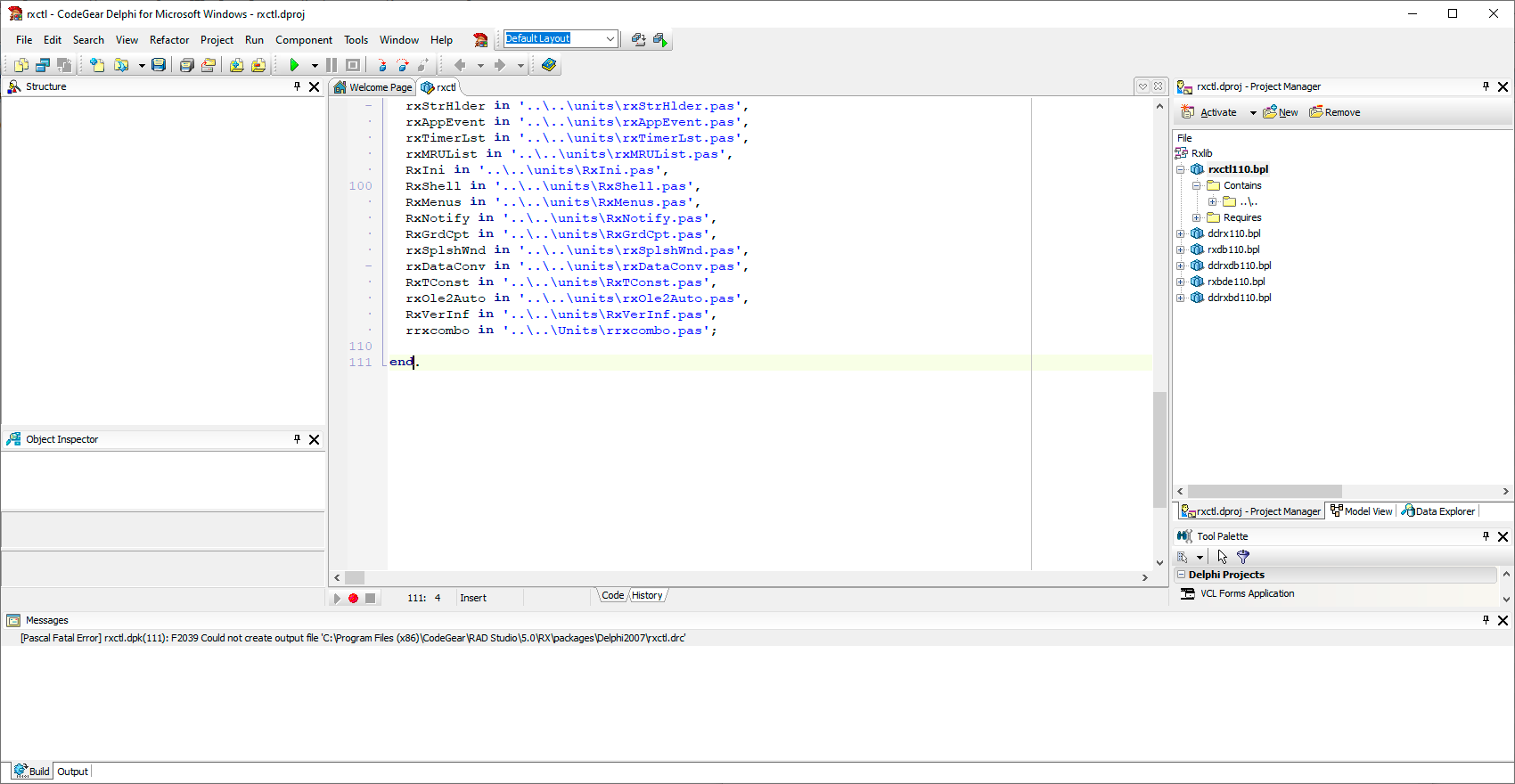
While installing RX Components Library the next
"[Pascal Fatal Error] rxctl.dpk(111): F2039 Could not create output file 'C:\Program Files (x86)\CodeGear\RAD Studio\5.0\RX\packages\Delphi2007\rxctl.drc'"
message appeared.
The problem solved by giving "Full access" to "Users" to the needed
"C:\Program Files (x86)\CodeGear\RAD Studio\5.0\RX\"
directory.

The similar error appeared in Embarcadero Delphi 11 Alexandria. The solution is also the same.

CodeGear Delphi 2007 for Win32: F2039 Could not create output file
Embarcadero, RAD Studio Reference, gives the similar recommendation:
F2039 Could not create output file '%s' (Delphi)

Borland.Delphi.Targets was not found

Applied to Delphi 2007/2009, Windows 8.1/10/11
Borland.Delphi.Targets was not found
Error
Unable to load project ... .dproj The imported project "C:\Windows\ Microsoft.NET \F…\Borland.Delphi.Targets" was not found. Confirm that the path in the declaration is correct, and that the file exists on disk.
... .dproj
There are a lot of topics in the Internet containing the error message
The imported project "C:\Windows\Microsoft.NET\Framework64\v2.0.50727\Borland. Delphi.Targets" was not found. Confirm that the path in the <Import> declaration is correct, and that the file exists on disk.
RAD keeps the copies of Targets files in the
"C:\ProgramData\{B59CE2E6-B15A-4F23-BD0E-72BF2ADDC3C7}\core\7EFD2DA3\6C948720\"
directory, and they can be copied to
"C:\Windows\Microsoft.NET\Framework\v2.0.50727\"
("C:\Windows\Microsoft.NET\Framework64\v2.0.50727\") /
sometimes to
"C:\Windows\Microsoft.NET\Framework\v4.0.30319"
("C:\Windows\Microsoft.NET\Framework64\v4.0.30319")
if absent.

But error can still exist!
The matter to give "Full control" to "ALL APPLICATION PACKAGES" ("Все пакеты приложений") for the "C:\Windows\Microsoft.NET\" directory.


Note:
"ALL APPLICATION PACKAGES" ("Все пакеты приложений"), appeared with WIN 8.
SID - ALL_APP_PACKAGES
The All Application Packages group is a well-known group with a predefined SID. The group must have specific access to certain locations of the registry and file system for Microsoft Store Apps to function properly.

There is a more clumsy ways to fix this error.
Find the line <Import Project="$(MSBuildBinPath)\Borland.Delphi.Targets" /> in project file .dproj. This line is located about at the end of file.
Replace the value "$(MSBuildBinPath)\Borland.Delphi.Targets" with full path to file, for instance: "C:\Windows\Microsoft.NET\Framework\v2.0.50727\Borland.Delphi.Targets"
Note:
Directory "C:\Windows\Microsoft.NET\Framework\v2.0.50727"
stands for .NET Framework, Version 2.0, Visual Studio Version 2005
Directory "C:\Windows\Microsoft.NET\Framework\v4.0.30319"
stands for .NET Framework, Version 4.0/4.5.2, Visual Studio Version 2010/2012
or launch the Delphi as Adminnistrator. As a more permanent solution, change the shortcut's properties to always run as administrator.