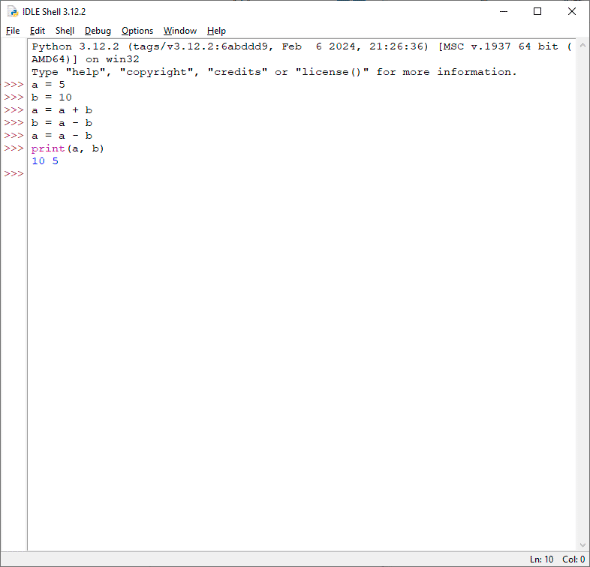
a = 5 b = 10 a = a + b b = a - b a = a - b print(a, b) 10 5I found this algorithm interesting.
Example made in Python
a = 5 b = 10 a = a + b b = a - b a = a - b print(a, b) 10 5I found this algorithm interesting.
A favicon (/ˈfæv.ɪˌkɒn/; short for favorite icon), also known as a shortcut icon, website icon, tab icon, URL icon, or bookmark icon, is a file containing one or more small icons associated with a particular website or web page.
In March 1999, Microsoft released Internet Explorer 5, which supported favicons for the first time. Originally, the favicon was a file called favicon.ico placed in the root directory of a website. It was used in Internet Explorer's favorites (bookmarks) and next to the URL in the address bar if the page was bookmarked.
Taken from Wikipedia
To add an icon to the site one must place an ico format file named favicon.ico in the root directory of the site.
But the uniGUI site does not have a root directory. Placing favicon.ico in the module directory does nothing.
This problem can be solved in various ways.
The Viber Analyzer on uniGui project and Embarcadero Delphi 10.4.1 Sydney are used as an example.
The first way is the most obvious.
Since web application is coded in Delphi, one can add an icon to it, like to an ordinary program.
The icon can be set in the Project->Options...->Application->Icons->Application Icon Settings->Icon.
And this icon will be the site icon.


procedure TUniServerModule.UniGUIServerModuleBeforeInit(Sender: TObject);
begin
  try
    Favicon.LoadFromFile('favicon.ico');
  except
  end;
end;
procedure TUniServerModule.UniGUIServerModuleBeforeInit(Sender: TObject);
begin
  try
    TUniGUIServerModule(Sender).Favicon.LoadFromFile('favicon.ico');
  except
  end;
end;
There is the requirement for XML document to have exactly one root element.
The error informs that ".dproj file" which is the document in XML format does not adhere to this requirement and thus malformed.
Perhaps, the .dproj file has been corrupted.


Two components: UniDBGrid (class TuniDBGrid) and UniDBVerticalGrid (class TuniDBVerticalGrid) showed erratic behavior in Embarcadero Delphi 11 environment. Both of them gave out error “Argument out of range” after placing om form. The mouse became trapped inside the form and it was difficult to release.
Several other components from some Categories: uniGUI Standard: UniCheckBox, UniGridPivotExcelExporter, UniStringGrid, UniFieldSet, UniFieldContainer, uniGUI Additional: UniBitBtn, UniDBEdit, uniGUI Data Controls: UniDBNumberEdit, UniDBMemo, UniDBHTMLMemo, UniDBNavigator, UniDBListBox, UniDBImage were tested and looks like they worked as expected.

Either UniDBGrid or UniDBVerticalGrid did not generate any errors and were workable in Embarcadero Delphi 10.4.1 environment.
An interesting fact: if the project is created, these components are placed on the form and everything is saved in the Delphi 10.4.1 environment, then these components and the project is workable if opened in Delphi 11.3.
Argument out of range Details:
[5B9CA55A]{rtl280.bpl } System.Classes.TCollection.GetItem (Line 6398, "System.Classes.pas" + 1) + $A [528F535A]{vcldb280.bpl} Vcl.DBGrids.TDBGridColumns.GetColumn (Line 1888, "Vcl.DbGrids.pas" + 1) + $4 [528F7C9E]{vcldb280.bpl} Vcl.DBGrids.TCustomDBGrid.DrawCell (Line 3008, "Vcl.DbGrids.pas" + 78) + $B [5ADF307B]{vcl280.bpl } Vcl.Graphics.TCanvas.FontChanged (Line 4346, "Vcl.Graphics.pas" + 4) + $A [5AF7C537]{vcl280.bpl } Vcl.Grids.DrawCells (Line 2421, "Vcl.Grids.pas" + 48) + $12 [5AF7CEE5]{vcl280.bpl } Vcl.Grids.TCustomGrid.Paint (Line 2600, "Vcl.Grids.pas" + 125) + $2F [5C585B2F]{vclactnband280.bpl} Vcl.ActnMenus.CallWindowHook (Line 762, "Vcl.ActnMenus.pas" + 20) + $F [5ADF2D92]{vcl280.bpl } Vcl.Graphics.TCanvas.SetPenPos (Line 4221, "Vcl.Graphics.pas" + 1) + $9 [5AE23A27]{vcl280.bpl } Vcl.Controls.TCustomControl.PaintWindow (Line 14691, "Vcl.Controls.pas" + 6) + $5 [5AE1D3B5]{vcl280.bpl } Vcl.Controls.TWinControl.PaintHandler (Line 10728, "Vcl.Controls.pas" + 4) + $14 [5AE1DBB0]{vcl280.bpl } Vcl.Controls.TWinControl.WMPaint (Line 10931, "Vcl.Controls.pas" + 6) + $5 [5AE239C1]{vcl280.bpl } Vcl.Controls.TCustomControl.WMPaint (Line 14680, "Vcl.Controls.pas" + 2) + $4 [5AE1802E]{vcl280.bpl } Vcl.Controls.TControl.WndProc (Line 7591, "Vcl.Controls.pas" + 91) + $6 [5AE19B02]{vcl280.bpl } Vcl.Controls.TControl.GetStyleName (Line 8627, "Vcl.Controls.pas" + 1) + $8 [5AE19B2E]{vcl280.bpl } Vcl.Controls.TControl.GetStyleName (Line 8631, "Vcl.Controls.pas" + 5) + $7 [5B8D0683]{rtl280.bpl } System.TObject.Dispatch (Line 19228, "System.pas" + 11) + $0 [5AF270E5]{vcl280.bpl } Vcl.Themes.TStyleHook.WndProc (Line 7713, "Vcl.Themes.pas" + 38) + $6 [5AF272C6]{vcl280.bpl } Vcl.Themes.TMouseTrackControlStyleHook.WndProc (Line 7812, "Vcl.Themes.pas" + 1) + $4 [5AF6B410]{vcl280.bpl } Vcl.Forms.TScrollingStyleHook.WndProc (Line 14905, "Vcl.Forms.pas" + 0) + $0 [5AF2690A]{vcl280.bpl } Vcl.Themes.TStyleHook.HandleMessage (Line 7418, "Vcl.Themes.pas" + 20) + $6 [5B04AE92]{vcl280.bpl } Vcl.Styles.TStyleEngine.HandleMessage (Line 3610, "Vcl.Styles.pas" + 22) + $7 [5AF23338]{vcl280.bpl } Vcl.Themes.TStyleManager.HandleMessage (Line 5872, "Vcl.Themes.pas" + 11) + $11 [5AE1B1D3]{vcl280.bpl } Vcl.Controls.TWinControl.DoHandleStyleMessage (Line 9462, "Vcl.Controls.pas" + 0) + $F [5AE1D1F5]{vcl280.bpl } Vcl.Controls.TWinControl.WndProc (Line 10644, "Vcl.Controls.pas" + 170) + $6 [7A97FA59]{uniGUI28Core.bpl} Uniguibaseclasses.TUniGUIBaseControl.VCLWndProc + $19 [5AE1C700]{vcl280.bpl } Vcl.Controls.TWinControl.MainWndProc (Line 10321, "Vcl.Controls.pas" + 3) + $6 [5B9E5C1C]{rtl280.bpl } System.Classes.StdWndProc (Line 18517, "System.Classes.pas" + 8) + $0 [5AF65263]{vcl280.bpl } Vcl.Forms.TApplication.ProcessMessage (Line 11488, "Vcl.Forms.pas" + 23) + $1 [5AF652A6]{vcl280.bpl } Vcl.Forms.TApplication.HandleMessage (Line 11518, "Vcl.Forms.pas" + 1) + $4 [5AF655E5]{vcl280.bpl } Vcl.Forms.TApplication.Run (Line 11657, "Vcl.Forms.pas" + 27) + $3 [002380A2]{bds.exe } bds.bds (Line 227, "" + 16) + $2
