Unigui is not only uniGUI Web Application Framework for Delphi but Universal GUI Framework for Python
It turns out, the Unigui is not only uniGUI Web Application Framework for Delphi but Universal GUI Framework and Protocol for Python (on Github UNISI project)
How to Fix ImportError: cannot import name 'escape' from

or
ImportError: cannot import name 'escape' from 'jinja2'
There is no possibility to import name 'escape' from 'flask' (or jinja2).
Today the simplest way is to use
from markupsafe import escape instead of from flask import escape.
Jinja is a dependency of Flask and Flask V1.X.X uses the escape module from Jinja, however support for the escape module was dropped in newer versions of Jinja.
Markup and escape should be imported from MarkupSafe.
from flask import escape was found on the page in the article It’s Time to Escape (Your Data) in the book "Head First Python, 2nd Edition" by Paul Barry, released November 2016, Publisher(s): O'Reilly Media, Inc.
Swapping two variables without using another variable (Arithmetic Operator)
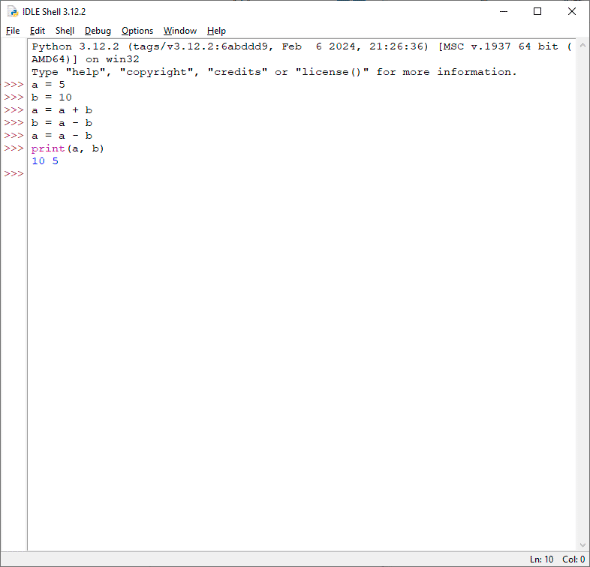
a = 5 b = 10 a = a + b b = a - b a = a - b print(a, b) 10 5I found this algorithm interesting.
Example made in Python
Three ways how to add a favicon in uniGui
A favicon (/ˈfæv.ɪˌkɒn/; short for favorite icon), also known as a shortcut icon, website icon, tab icon, URL icon, or bookmark icon, is a file containing one or more small icons associated with a particular website or web page.
In March 1999, Microsoft released Internet Explorer 5, which supported favicons for the first time. Originally, the favicon was a file called favicon.ico placed in the root directory of a website. It was used in Internet Explorer's favorites (bookmarks) and next to the URL in the address bar if the page was bookmarked.
Taken from Wikipedia
To add an icon to the site one must place an ico format file named favicon.ico in the root directory of the site.
But the uniGUI site does not have a root directory. Placing favicon.ico in the module directory does nothing.
This problem can be solved in various ways.
The Viber Analyzer on uniGui project and Embarcadero Delphi 10.4.1 Sydney are used as an example.
The first way is the most obvious.
Since web application is coded in Delphi, one can add an icon to it, like to an ordinary program.
The icon can be set in the Project->Options...->Application->Icons->Application Icon Settings->Icon.
And this icon will be the site icon.


The second way is a solution from the uniGUI.
A uniGui project has one specialized data module - TUniGUIServerModule.
This is a singleton object that implements server-side functions of a web application.
This module is in the forms list, one must select this module, find the "Favicon" property in the object inspector and load the icon into it.

The UniGUI Server icon in the property of Windows application, which is visible, for example, in Windows Explorer, is taken from the Project Options in Delphi
The third way is one line of code in the OnBeforeInit event handler in the TUniGUIServerModule successor.
Now, on launching a web application, the icon will be loaded from an external file, and if missing, the icon can added by one of two ways previously described.
procedure TUniServerModule.UniGUIServerModuleBeforeInit(Sender: TObject);
begin
  try
    Favicon.LoadFromFile('favicon.ico');
  except
  end;
end;
procedure TUniServerModule.UniGUIServerModuleBeforeInit(Sender: TObject);
begin
  try
    TUniGUIServerModule(Sender).Favicon.LoadFromFile('favicon.ico');
  except
  end;
end;Unable to load project in Delphi 2007. Only one top level element is allowed in an XML document

"Only one top level element is allowed in an XML document"
There is the requirement for XML document to have exactly one root element.
The error informs that ".dproj file" which is the document in XML format does not adhere to this requirement and thus malformed.
Perhaps, the .dproj file has been corrupted.

If the matter is with dpk file, the way to solve is to create an empty package and import the files in.
Subscribe to:
Posts (Atom)