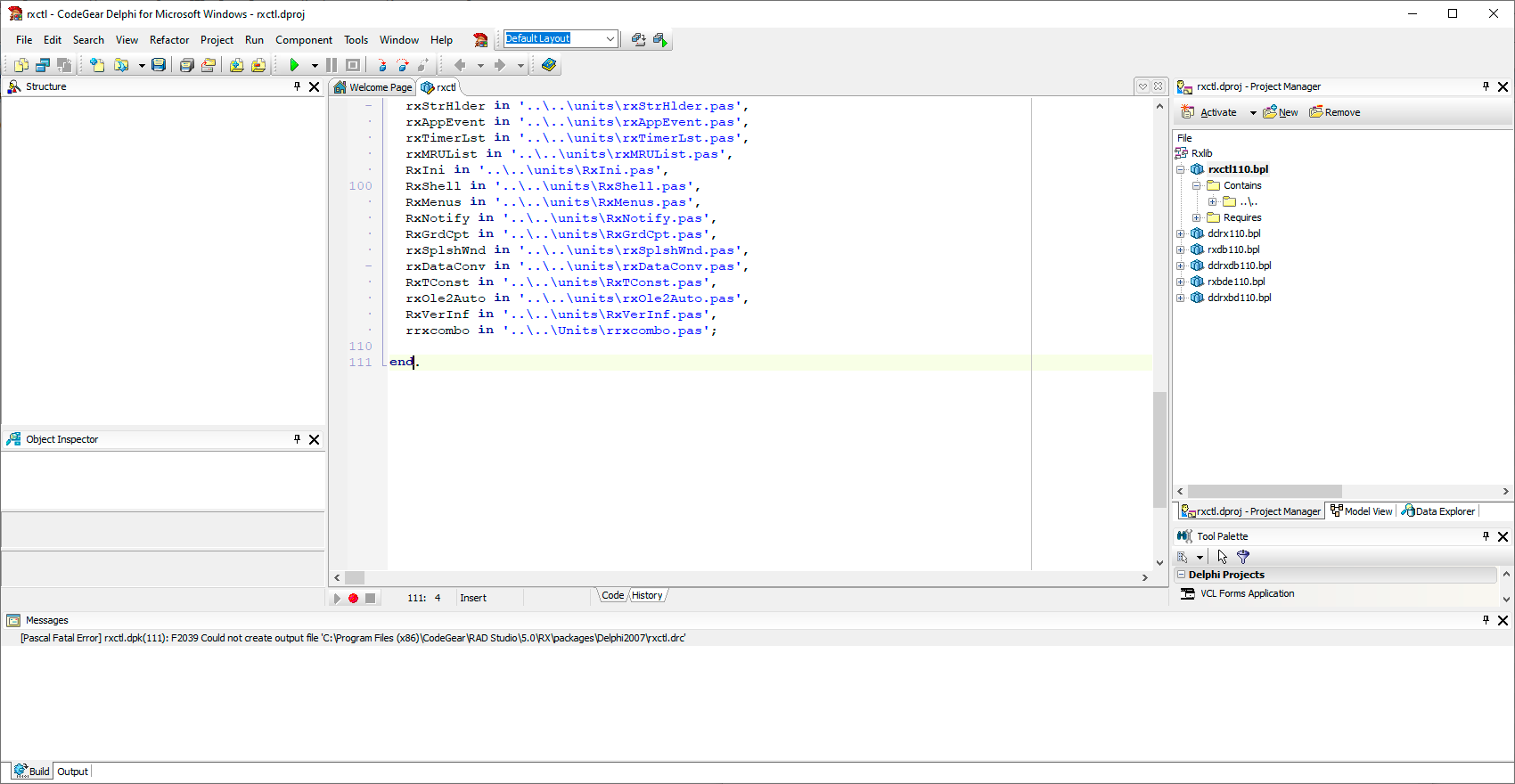
While installing RX Components Library the next
"[Pascal Fatal Error] rxctl.dpk(111): F2039 Could not create output file 'C:\Program Files (x86)\CodeGear\RAD Studio\5.0\RX\packages\Delphi2007\rxctl.drc'"
message appeared.
The problem solved by giving "Full access" to "Users" to the needed
"C:\Program Files (x86)\CodeGear\RAD Studio\5.0\RX\"
directory.
The similar error appeared in Embarcadero Delphi 11 Alexandria. The solution is also the same.
Embarcadero, RAD Studio Reference, gives the similar recommendation:
F2039 Could not create output file '%s' (Delphi)
Borland.Delphi.Targets was not found
Applied to Delphi 2007/2009, Windows 8.1/10/11
Error
Unable to load project ... .dproj The imported project "C:\Windows\ Microsoft.NET \F…\Borland.Delphi.Targets" was not found. Confirm that the path in the declaration is correct, and that the file exists on disk.
... .dproj
There are a lot of topics in the Internet containing the error message
"C:\ProgramData\{B59CE2E6-B15A-4F23-BD0E-72BF2ADDC3C7}\core\7EFD2DA3\6C948720\"
directory, and they can be copied to
"C:\Windows\Microsoft.NET\Framework\v2.0.50727\"
("C:\Windows\Microsoft.NET\Framework64\v2.0.50727\") /
sometimes to
"C:\Windows\Microsoft.NET\Framework\v4.0.30319"
("C:\Windows\Microsoft.NET\Framework64\v4.0.30319")
if absent.
Note:
"ALL APPLICATION PACKAGES" ("Все пакеты приложений"), appeared with WIN 8.
SID - ALL_APP_PACKAGES
There is a more clumsy ways to fix this error.
Find the line <Import Project="$(MSBuildBinPath)\Borland.Delphi.Targets" /> in project file .dproj. This line is located about at the end of file.
Replace the value "$(MSBuildBinPath)\Borland.Delphi.Targets" with full path to file, for instance: "C:\Windows\Microsoft.NET\Framework\v2.0.50727\Borland.Delphi.Targets"
Note:
Directory "C:\Windows\Microsoft.NET\Framework\v2.0.50727"
stands for .NET Framework, Version 2.0, Visual Studio Version 2005
Directory "C:\Windows\Microsoft.NET\Framework\v4.0.30319"
stands for .NET Framework, Version 4.0/4.5.2, Visual Studio Version 2010/2012
or launch the Delphi as Adminnistrator. As a more permanent solution, change the shortcut's properties to always run as administrator.

Unable to load project ... .dproj The imported project "C:\Windows\ Microsoft.NET \F…\Borland.Delphi.Targets" was not found. Confirm that the path in the
... .dproj
There are a lot of topics in the Internet containing the error message
The imported project "C:\Windows\Microsoft.NET\Framework64\v2.0.50727\Borland. Delphi.Targets" was not found. Confirm that the path in the <Import> declaration is correct, and that the file exists on disk.RAD keeps the copies of Targets files in the
"C:\ProgramData\{B59CE2E6-B15A-4F23-BD0E-72BF2ADDC3C7}\core\7EFD2DA3\6C948720\"
directory, and they can be copied to
"C:\Windows\Microsoft.NET\Framework\v2.0.50727\"
("C:\Windows\Microsoft.NET\Framework64\v2.0.50727\") /
sometimes to
"C:\Windows\Microsoft.NET\Framework\v4.0.30319"
("C:\Windows\Microsoft.NET\Framework64\v4.0.30319")
if absent.
But error can still exist!
The matter to give "Full control" to "ALL APPLICATION PACKAGES" ("Все пакеты приложений") for the "C:\Windows\Microsoft.NET\" directory.
Note:
"ALL APPLICATION PACKAGES" ("Все пакеты приложений"), appeared with WIN 8.
SID - ALL_APP_PACKAGES
The All Application Packages group is a well-known group with a predefined SID. The group must have specific access to certain locations of the registry and file system for Microsoft Store Apps to function properly.
There is a more clumsy ways to fix this error.
Find the line <Import Project="$(MSBuildBinPath)\Borland.Delphi.Targets" /> in project file .dproj. This line is located about at the end of file.
Replace the value "$(MSBuildBinPath)\Borland.Delphi.Targets" with full path to file, for instance: "C:\Windows\Microsoft.NET\Framework\v2.0.50727\Borland.Delphi.Targets"
Note:
Directory "C:\Windows\Microsoft.NET\Framework\v2.0.50727"
stands for .NET Framework, Version 2.0, Visual Studio Version 2005
Directory "C:\Windows\Microsoft.NET\Framework\v4.0.30319"
stands for .NET Framework, Version 4.0/4.5.2, Visual Studio Version 2010/2012
or launch the Delphi as Adminnistrator. As a more permanent solution, change the shortcut's properties to always run as administrator.
«SetThreadContext failed» Delphi 2007/2009 Windows x64

First solution is at CodeCentral (unavailable)
Second solution is to search on Google
Third solution is my advice: Windows 64bit Delphi 2007/2009 Debugger Fix / Workaround with "Assertion failure" error
How do I determine the Delphi version created project
Check Project File Extensions
For personal reference
If there is
If there is
If there is
If there is not even a
if
As for Delphi 2005 and 2006 there is a
In Delphi 2005 it looks like this:
In Delphi 2006 like this:
There is a
This section contains the following values:
Delphi 5: empty
Delphi 6: 6.0
Delphi 7: 7.0
If no version is given, the
Delphi 5: Packages=...;Vcl50;...
Delphi 4: Packages=...;VCL40;...
Delphi 3: Packages=...;VCL30;...
Examples:
Delphi 3
Delphi 5
For personal reference
If there is
.dproj file, it's a Delphi version >= 2007.If there is
.bdsproj file, it's Delphi 2005 or 2006.If there is
.dof file, it's Delphi 5-7.If there is not even a
.dof file, no methods.
.dproj file
if .dproj file exists in XML format containing a version entry \project\PropertyGroup\ProjectVersion
- Delphi 2007: empty
- Delphi 2009 and 2010: 12.0
- Delphi XE: 12.2
- Update1: 12.3
- Delphi XE2: 13.4
- Delphi XE3: 14.3
- Update 2: 14.4
- Delphi XE4: 14.4 (the same as previous - Delphi XE3, Update 2)
- Update 1: 14.6
- Delphi XE5: 15.1 or 15.3
- Delphi XE6: 15.4
- Delphi XE7: 16.0
- Update 1: 16.1
- Delphi XE8: 17.1 or 17.2
- Delphi 10 Seattle: 18.0
- Update 1: 18.1
- Delphi 10.1 Berlin: 18.1 (the same as previous - Delphi 10 Seattle, Update 1)
- Update 1: 18.2
- Delphi 10.2 Tokyo: 18.2 (the same as previous - Delphi 10.1 Berlin, Update 1)
- Update 2: 18.3
- Update 3: 18.4
- Delphi 10.3 Rio: 18.5
- Update 1: 18.6
- Update 2: 18.7
- Update 3: 18.8
- Delphi 10.4 Sydney: 19.0
- Update 1: 19.1
- Update 2: 19.2
- Delphi 11.0 Alexandria: 19.3
- Delphi 11.1 (Update 1 for Delphi 11): 19.4
- Delphi 12.0 Athens: 20.1 (or maybe 20.0)
- Delphi 12.2 (Update 2 for Delphi 12): 20.2
- Delphi 12.3 (Update 3 for Delphi 13): 20.3
- Delphi 13.0 Florence: 20.3 (the same as previous - Delphi 12.3, Update 3)
.bdsproj file
As for Delphi 2005 and 2006 there is a .bdsproj file in XML format containing a version entry: \BorlandProject\PersonalityInfo\Option\OptionIn Delphi 2005 it looks like this:
<Option Name="Version" Type="String">1.0</Option>In Delphi 2006 like this:
<Option Name="Version">1.0</Option>
.dof file
There is a [FileVersion] section in .dof file in .ini format for each project up to Delphi 7 inclusively.This section contains the following values:
Delphi 5: empty
Delphi 6: 6.0
Delphi 7: 7.0
If no version is given, the
Packages entry in the [directories] section includes the Delphi version number multiplied by 10:Delphi 5: Packages=...;Vcl50;...
Delphi 4: Packages=...;VCL40;...
Delphi 3: Packages=...;VCL30;...
Examples:
Delphi 3
[Directories]
Packages=VCLX30;VCL30;INETDB30;INET30;Delphi 5
[Directories]
Packages=Vcl50;Inet50;Inetdb50;Vclx50;Indy50;
Subscribe to:
Posts (Atom)